
Tutoring Social Media Post Ideas and a Plan You Can Keep
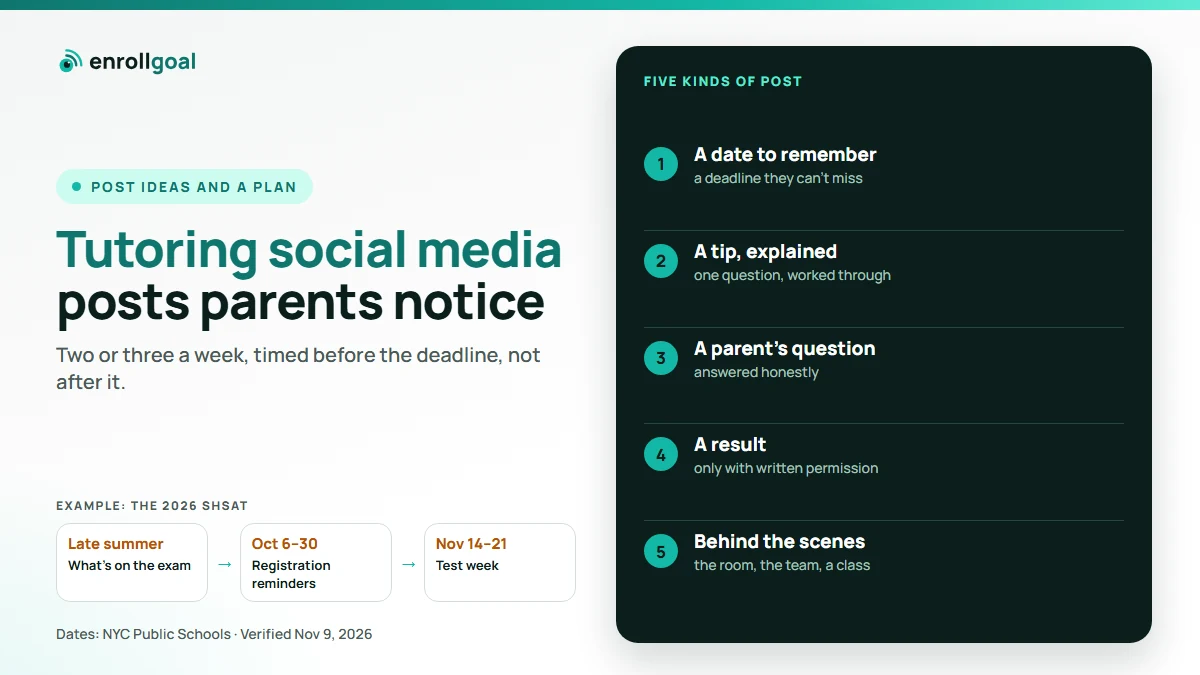
The tutoring social media posts parents notice fall into five kinds: a date to remember, a tip, a parent's question answered, a result shared with the family's permission, and a look behind the scenes. Two or three a week is enough if they arrive at the right time, before a registration deadline rather than after it. This guide gives post ideas for each kind, a calendar to time them to, and a plan you can keep in the weeks you're busiest.
When we checked this search in November 2026, many of the pages ranking for it were template galleries, flyer boards and 30-day lists. They're a fine place to start, but they leave out what matters most to a tutoring or test-prep business: your exam calendar, and what you're allowed to post about a student.
Key takeaways
- Post useful things, not ads: a date, a tip, a question answered.
- Time posts to decision points: registration opening, report cards, back to school.
- Share a student's result only with written permission from the parent, and don't present one result as typical.
- Plan a month of posts in one sitting, so the busiest weeks still have posts.
What should a tutoring business post on social media?
A tutoring business should post things a parent would save or forward to another parent. Stock photos with "Enroll now" get scrolled past. These five kinds of post give parents a reason to stop:
| Kind of post | What it does | How often |
|---|---|---|
| A date to remember | Reminds parents of a deadline they can't miss | Whenever one is coming |
| A tip or question explained | Shows how you teach | Weekly |
| A parent's question answered | Shows you understand their worry | Weekly or every other week |
| A result, with permission | Shows what happened for one family | When you have one |
| Behind the scenes | Shows the room, the team, a class | Every other week |
A useful mix: most posts are dates, tips and questions; results and behind the scenes fill in around them.
Tutoring social media post ideas, by kind
The examples below are for a made-up business, Bright Path Tutoring, the same one used in our tutoring website examples. Swap in your own exams, subjects, town and dates.
A date to remember
2026 SHSAT registration closes Friday, October 30. If you're not sure your child is registered, check this week. The official dates and how to register are on the NYC Public Schools website.
Name the date, say what the parent should do, and point to the official source. More date posts:
- Registration opens, with who to ask and where to look.
- A reminder a few days before registration closes.
- The test dates, a week or two before.
- When results come out, once the date is announced. Until then, say it hasn't been announced yet.
- Report cards coming home, for subject tutoring.
A tip or question explained
One SHSAT math habit that saves time: read what the question asks for before you start calculating. A carousel: the question, the common mistake, the fix.
Short and specific beats general. One question, worked through, is better than "five study tips". More ideas:
- One tip per subject or section of the exam.
- A common mistake and how to fix it.
- A routine for the morning of a practice test.
- A homework habit for a subject parents worry about, such as fractions or essay writing.
A parent's question answered
"Is it too late to start SHSAT prep in September?" A parent asked us this last week. Our honest answer, in three slides.
Use the questions parents ask you on the phone, without naming who asked. Each one is a post, and it will usually also make a good page on your website. Questions that come up often:
- "How long does prep take?"
- "Group or one-to-one?"
- "What happens in the first session?"
- "My child's grades are fine. Do they still need help for the test?"
A result, with permission
"[The parent's own words about what changed for their child]." Parent of a 7th grader, Summer SHSAT. Shared with permission.
Name the program, not the child. Post only the words the parent approved, and show them the post before it goes out. Results worth sharing, when a family agrees: a score jump, an acceptance, a better report card, a parent's thank-you.
Behind the scenes
Saturday practice test, 9 am. Pencils sharpened, room set, coffee for the parents in the waiting area.
Real photos of your room and team, without students' faces unless the parents have agreed. More ideas: a tutor introducing themselves in a few lines, the materials a program uses, the room before class.
Time posts to the exam and school calendar
A post about registration the week it opens is useful. The same post three weeks after it closes is noise. Parents decide around a few points in the year, and your posts should arrive just before each one:
| When | What parents are deciding | What to post |
|---|---|---|
| Late summer, back to school | Whether to start tutoring this year | What's on the exam, when it is, how prep works |
| Registration windows | Whether their child is registered | The deadline, who to ask, where to look |
| Report cards | Whether a grade needs help | A tip for the subject, a parent's question answered |
| Test week | How to get through it calmly | What the day looks like, a calm-morning tip |
| Results and offers | What comes next | Congratulations, with permission; next year's dates |
| Spring and early summer | Summer programs | The program, its dates, who it's for |
Take one exam as an example. For the 2026 SHSAT in New York City, registration ran from October 6 to 30, and the test is scheduled for November 14 to 21, 2026 (NYC Public Schools, Specialized High Schools; dates checked November 9, 2026). An SHSAT program's posts would run from late summer through the test in November: what the exam is, then registration reminders, then test week. Take every date from the official source, not from another tutor's post, and never post a date that hasn't been announced. Our guide on how to advertise tutoring services covers timing the rest of your marketing to the same calendar.
A weekly plan you can keep
Posting falls apart in the weeks you're busiest teaching, which are the weeks parents are deciding. The fix is to plan before those weeks arrive:
- Once a month, sit down for an hour. Look at the next six weeks of your exam and school calendar.
- Write the date posts first. Every deadline in those weeks gets one, plus a reminder a few days before.
- Fill the rest with tips and questions. Keep a running list of the questions parents ask you, and use two or three a month.
- Add results and behind-the-scenes posts when you have them. They don't need to be planned.
- Set the time when you write each post, if your platform or posting tool lets you schedule, so nothing depends on remembering.
Two or three posts a week, kept up every week, does more than ten posts in one week and silence for a month.
Results and student photos: ask the parent first
Results can persuade parents, and they're the posts most likely to go wrong. A few rules keep them honest:
- Get written permission from the parent before you post a child's result, photo, quote or name, and post only what they agreed to.
- Leave out what you don't need. A grade and a program are enough. A full name, school or face rarely adds anything.
- Quote real words only. Never write a testimonial yourself.
- Don't present your best result as typical. Under the FTC's Endorsement Guides, an endorsement must reflect the honest opinion and actual experience of the person giving it. The FTC says a specific result is usually read as what others can expect, and a line such as "results not typical" doesn't change that. So either have proof the result is typical, or clearly show what students generally achieve next to it.
The same rules apply to the reviews on your website.
Where a tutoring business should post
Post where the parents near you already are. For many tutoring businesses that means a Facebook Page, Instagram, local parent groups, and the updates on your Google Business Profile.
- Facebook and Instagram. A post written for one usually works on the other. A carousel suits a tip or a question explained.
- Local parent groups. Read each group's rules first, answer the question that was asked, and post your own material only where the group allows it.
- Your Google Business Profile. Google lets you post updates, offers and events to your profile, and a live post shows on Google Search and Maps. Posts older than six months are archived unless you set a date range, and Google says posts with a phone number in the text might be rejected, so use its Call button instead (Google Business Profile Help, posts; posts content policy). Your date posts fit here well, since a parent searching for you sees them.
Our guide on how parents find tutors on Google and ChatGPT covers the rest of what your profile does.
How to tell if your posts are working
Likes are easy to count and tell you little. Watch for the signs that a post started something:
- Saves and shares. A parent who saves a post plans to use it. A share sends it to another parent.
- Comments and messages. A question in the comments or a direct message is a conversation, and often an inquiry.
- Inquiries that mention a post. Ask every new family how they found you, and write it down.
Treat every message from a parent as an inquiry, and reply the same day. Our guide on how to get tutoring clients covers what to say, and a tutoring CRM or a simple sheet keeps track of where each family came from.
Where EnrollGoal fits
Our social media service for tutoring businesses is in pilot. We turn what you already have, a date to remember, a question a parent asked, a result you're allowed to share, into posts planned from your exam calendar, which a person checks against the official source. You approve each post before it goes out, and we schedule it. Results go out only with written permission from the parent. Each month you see which posts people saved, shared and commented on. Pilot pricing is set with you before you commit.
We post this way for HighScores.ai, our own test-prep platform, today (why we built EnrollGoal).